

How to Solve Your Indoor Golf Simulator Space and Distance Problems
Why a Golf Simulator Solver Changes How You Practice and Play
A golf simulator solver is the computational engine behind modern indoor golf — it takes raw swing data and turns it into actionable insight about where your ball will go, why, and what you should do differently.
Here's a quick breakdown of what a golf simulator solver does:
What It Does How It Helps You Models ball flight, bounce, and roll using physics Predicts exactly where your shot lands Processes launch monitor data (speed, spin, launch angle) Turns numbers into real shot outcomes Applies wind, elevation, and turf conditions Simulates real course conditions indoors Classifies shots (draw, fade, push, pull, etc.) Shows patterns in your misses Recommends optimal club and shot strategy Gives you a data-driven game plan
Most golfers think of a simulator as just a big screen with a projector. But the solver running underneath is what separates a realistic training tool from a fancy video game.
If you've ever hit a great shot on the range and then struggled to repeat it on the course — that gap is exactly what solver technology is designed to close.

Understanding the Core Technology of a Golf Simulator Solver
To understand how a golf simulator solver works, we have to look under the hood at the physics-based modeling that occurs in the fractions of a second between your club hitting the ball and the virtual ball flying across the screen.
When you strike a golf ball, a complex chain of physical events is set in motion. A high-performance solver does not simply guess where the ball will land based on its initial speed. Instead, it runs continuous numerical integrations to map out the ball's entire life cycle: from the aerial phase, through the violent collision of the bounce, and finally to the smooth deceleration of the roll.
In the air, the ball is subject to gravity, drag (air resistance), and lift (caused by the spin of the ball, known as the Magnus effect). To handle these calculations with extreme precision, modern software developers rely on specialized open-source physics engines. For example, the libgolf C++ library is a prominent framework designed to simulate golf ball trajectories by calculating these exact aerodynamic forces. It handles automatic phase transitions, ensuring that the shift from high-velocity flight to ground contact is calculated seamlessly rather than treated as separate, disconnected events.
The Physics of Flight, Bounce, and Roll in a Golf Simulator Solver
During the aerial phase, the solver calculates how lift and drag dynamically change as the ball's velocity decreases and its spin decays. Lift is highly dependent on the spin axis and spin rate. Backspin keeps the ball airborne longer, while sidespin tilts the lift vector, causing the ball to curve (producing draws, fades, pushes, or slices).
Once the ball makes contact with the ground, the solver transitions from flight physics to impact mechanics. This transition requires calculating:
Friction Coefficients: How much the surface grabs the ball, which directly affects how much spin is retained or converted into forward roll.
Deformation and Kinetic Energy: How much energy is lost when the ball compresses against the turf.
Green Stimp: For putting, the friction calculation must be incredibly precise.
For putting and short-game accuracy, solvers use models like those found in the putting physics simulation library, which is built upon peer-reviewed academic research (such as the work of physicist A.R. Penner). These models calculate how factors like a green's Stimp rating and slope percentage affect the ball. For instance, on a green with a Stimp rating of 10 and a 2% slope, a putt hit at an initial velocity of 72 inches per second will travel approximately 7.83 feet uphill (taking 2.61 seconds) versus 13.94 feet downhill (taking 4.65 seconds). A robust solver calculates these variations instantly to show you the true path of your ball.
Dynamic Ground Surfaces and 3D Terrain Systems
A golf ball behaves entirely differently when it lands in the fairway versus the rough or a sand bunker. Advanced simulator solvers use dynamic ground surface models to adjust friction, bounce elasticity, and spin reduction values based on the specific terrain type.
When the ball hits a 3D terrain system, the solver evaluates the surface normal (the angle of the slope at the exact point of impact). If the ball lands on a steep slope, the bounce vector is recalculated relative to that slope rather than flat ground. This determines whether the ball kicks forward, shoots sideways into the trees, or checks up softly on an elevated green.
Integrating Launch Monitor Data with Environmental Variables
A solver is only as good as the data you feed it. To construct an accurate simulation, the engine integrates real-time measurements from a launch monitor with user-defined or course-specific environmental variables.
High-speed cameras or radar-based systems track the club and ball at impact, feeding the solver five core metrics:
Club Speed: How fast the clubhead is moving at impact.
Launch Angle: The vertical angle at which the ball leaves the clubface.
Spin Rate: The backspin and sidespin (or spin axis) of the ball.
Ball Speed: The initial velocity of the ball.
Smash Factor: The efficiency of energy transfer (Ball Speed divided by Club Speed).
To understand how these inputs translate into real flight data, you can read our detailed guide on the Golf Launch Monitor technology we use.
The solver then layers environmental variables on top of these raw metrics:
Wind Vectors: Decomposing wind speed and direction relative to the target line into headwind, tailwind, and crosswind components.
Elevation: Adjusting air density and calculating how much sooner or later the ball will intersect with the ground.
Turf Conditions: Modifying the ground friction and bounce coefficients.
Launch Monitor Input Environmental Variable Solver Calculation Final Output Ball Speed & Launch Angle Elevation Air Density Integration Carry Distance Backspin & Sidespin Wind Vector (Speed/Direction) Aerodynamic Lift & Drift Lateral Deviation (Offline) Landing Angle & Spin Axis Turf Condition (Fairway/Rough) Friction & Bounce Mechanics Roll & Total Distance
Unit Conversion and Data Processing in a Golf Simulator Solver
Because golf is played globally, solvers must seamlessly handle both US customary units (yards, miles per hour, inches) and metric units (meters, kilometers per hour, centimeters).
To manage this, modern software architectures often utilize specialized processing engines. The OpenGolfCoach derived values library is an open-source, high-performance tool built with Rust and WebAssembly that automates these unit conversions. It ingests standardized JSON data formats from launch monitors, performs the complex physics calculations in a unified metric space, and then outputs the derived metrics in whichever format the user prefers. This ensures that whether you think in yards or meters, the underlying math remains flawlessly accurate.
Simple Trajectory Calculators vs. Advanced Optimization Solvers
There is a massive difference between a simple trajectory calculator and an advanced, optimization-based golf simulator solver.
A simple trajectory calculator is a passive tool. You input your swing numbers, and it draws a static line on a screen showing where the ball went. It is a one-way street: Swing $\rightarrow$ Calculate $\rightarrow$ Display.
An advanced optimization solver, however, is active and strategic. It uses algorithms like Mixed-Integer Linear Programming (MILP) and network optimization to solve the hole mathematically. Instead of just telling you where your ball did land, it can tell you where your next shot should land to minimize your total expected score.
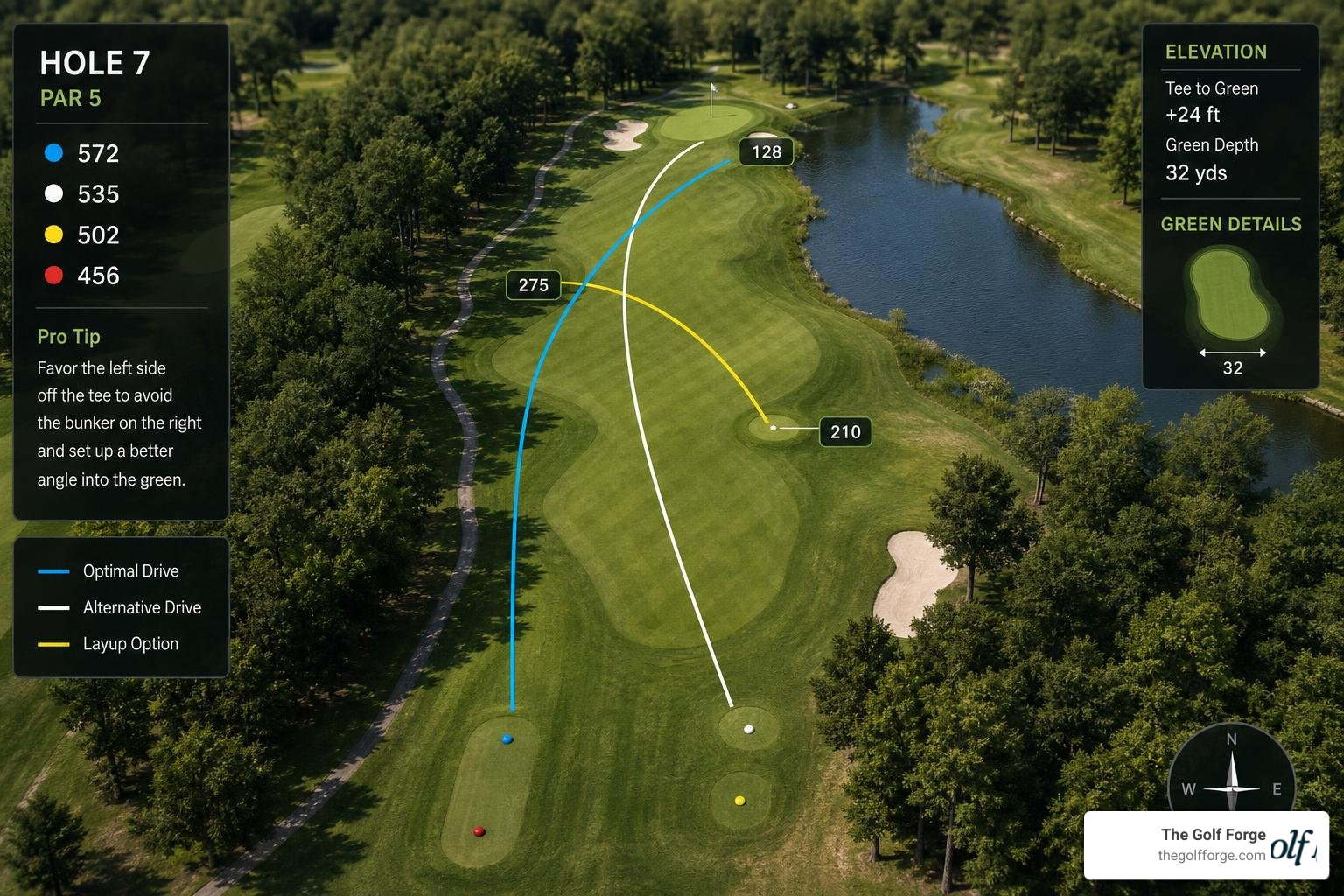
A prime example of this is the SAS PROC OPTMODEL caddie model, which was built to solve the strategy for Bogstad Golf Course in Oslo. This optimization model takes the course's topography, real-time wind vectors, and the player's unique club distances and handicap. It then runs an MILP algorithm to determine the mathematically optimal club sequence for each hole.
For instance, on a 310-meter par 4 with a stiff headwind, a "greedy" strategy of hitting driver might leave you in a narrow fairway neck surrounded by hazards. The optimization solver might calculate that the highest-probability route to par is actually a controlled 4-iron off the tee followed by a mid-iron to the green, minimizing the risk of a big number while respecting the player's handicap-adjusted stroke budget.
Visualizing Shot Parameters and Managing Risk
One of the most powerful aspects of modern solver technology is its ability to help players visualize their performance and make smarter decisions on the course.
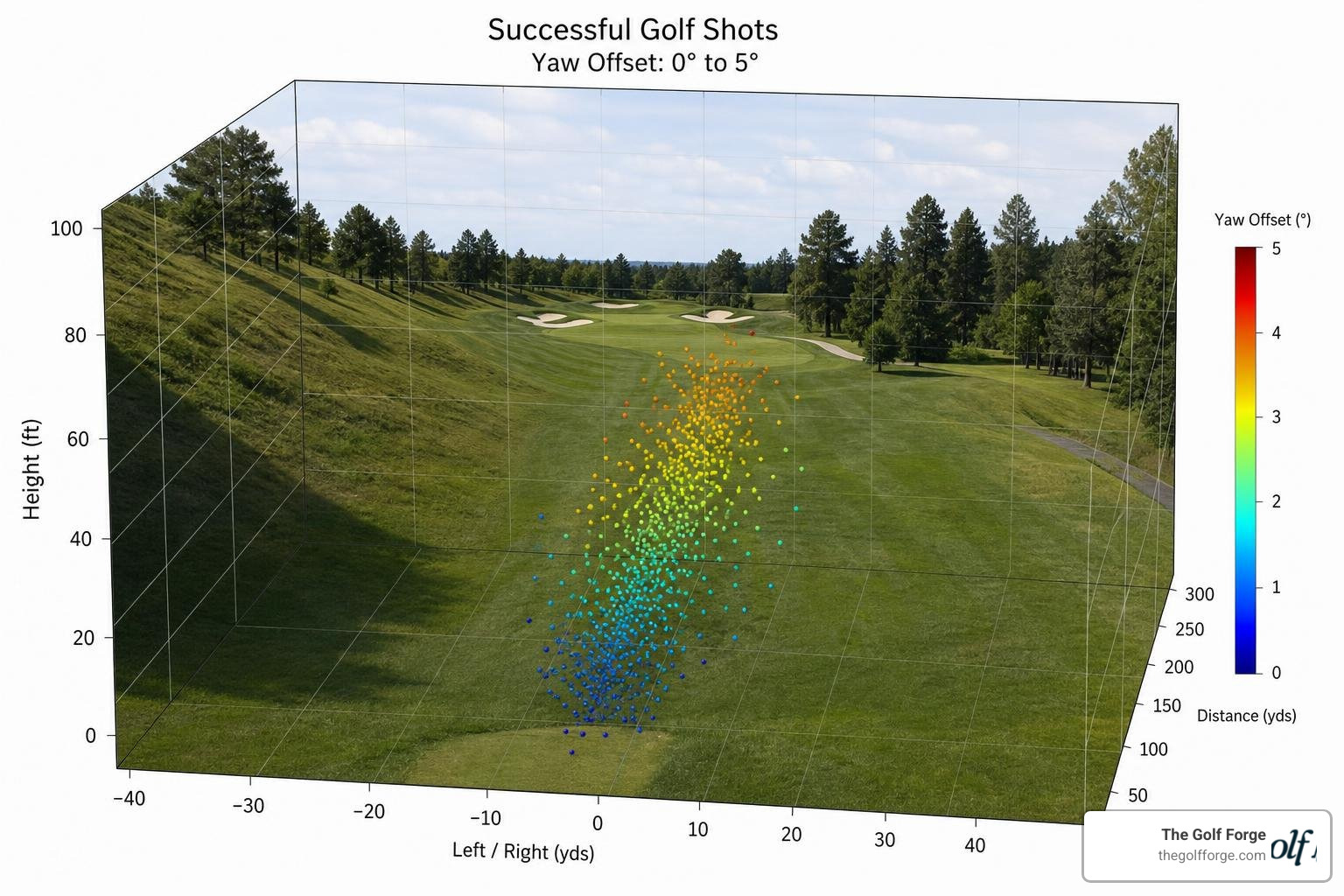
Using parameter visualizers, developers can run large-scale Monte Carlo simulations—sometimes launching tens of thousands of simulated shots with slight variations in power, pitch, and yaw (aim)—to map out a player's "landing bucket."
Data analyzed using the Golf Parameter Solver visualization tool reveals fascinating insights into course strategy:
The Left-Side Hill Effect: In a 3D scatter plot analysis of successful shots on a course with a left-side hill, nearly all successful shots had a yaw offset between 0° and +5°. This proves mathematically that aiming slightly right (or left, depending on the slope) to let the terrain feed the ball toward the target yields a much higher success rate than aiming dead at the flag.
The Triangle of Safety: 2D colormap visualizations show that the optimal combinations of power and yaw typically form an upward-opening triangle. This means players gain the most margin for error by aiming slightly conservative and overshooting their target slightly, rather than trying to pin-seek and falling short into hazards.
Once a shot is simulated, the solver uses deterministic rules to classify the shot shape (e.g., Straight, Pull, Push, Draw, Fade, Hook, Slice, Push Slice) and assigns it a rank and color-coded visualization. This immediate visual feedback helps players quickly identify patterns in their swing path and face angle.
Execution Variability and the Human Factor
Of course, a computer can draw the perfect line, but humans are not robots. We get tired, we lose focus, and our swings vary from shot to shot.
An advanced solver accounts for this execution variability. By analyzing your historical swing consistency, the solver does not just show you the path of a perfect shot; it maps out your personal dispersion ellipse. If your dispersion with a driver is 40 yards wide, but only 15 yards wide with a 3-wood, the solver will adjust its strategic recommendations accordingly.
Working with a dedicated Swing Coach alongside solver data allows you to bridge the gap between mathematical theory and physical execution, building the mental resilience needed to execute high-percentage shots under pressure.
Practical Applications for Golfers and Commercial Facilities
Whether you are a scratch golfer, a business owner, or someone looking to practice year-round in Utah, golf simulator solvers offer immense practical value:
Course Strategy Planning: Before you travel for a tournament or play a challenging local course, you can load the course map into a solver to build a data-driven caddie book. You will know exactly which clubs to hit off every tee to stay in wide landing zones.
Equipment Fitting: A solver can isolate variables to show you exactly how a change in driver loft or shaft stiffness affects your launch angle, spin rate, and total distance. This eliminates guesswork during the club-fitting process.
Commercial Facility Optimization: For indoor golf centers, highly optimized solvers reduce processing delays (using technologies like "Instant Impact" to display the ball flight immediately after contact), keeping customers engaged and maximizing bay throughput.
At The Golf Forge, we leverage these advanced technologies to offer premium indoor practice. If you are looking to take your game to the next level, explore our full range of Services to see how we integrate data with elite training environments.
Frequently Asked Questions about Golf Simulator Solvers
What is the difference between a launch monitor and a golf simulator solver?
A launch monitor is the hardware device (cameras or radar) that physically measures the ball and club at the moment of impact. The golf simulator solver is the software engine that takes those raw measurements, applies physics equations, accounts for environmental factors like wind and elevation, and calculates the ball's actual flight path, bounce, and roll.
How do solvers handle wind and elevation changes?
Solvers use vector mathematics to decompose wind into headwind, tailwind, and crosswind components. They adjust the aerodynamic lift and drag calculations based on the air density at your simulated elevation, allowing you to see exactly how much further your ball carries in high-altitude environments (like Utah's mountain courses) compared to sea level.
Can a solver help me choose the right club for my handicap?
Yes. Advanced solvers that utilize optimization models (like Mixed-Integer Linear Programming) can analyze your personal swing consistency and handicap-adjusted stroke budget. Instead of recommending the club that goes the furthest, the solver calculates the club sequence that minimizes your risk of landing in hazards, giving you the highest statistical probability of scoring well.
Conclusion
The days of hitting balls into a net and guessing where they went are long gone. By utilizing a sophisticated golf simulator solver, you can transform your practice sessions from blind repetition into a highly precise, data-driven science.
At The Golf Forge, we are proud to be at the forefront of Utah's indoor golf training industry. Operating 24/7 private bays equipped with advanced Foresight launch-monitor technology, we provide golfers in South Jordan, UT, and West Jordan, UT, with the ultimate environment for consistent, data-driven practice.
Ready to stop guessing and start solving your game? Book a session in our state-of-the-art facilities today and experience the power of advanced simulator technology for yourself. Check out our Services page to get started!